

Let’s be honest: if you work in care management, social services, or guardianship, you’ve probably sat through a meeting where someone said “AI” and everyone nodded like they knew exactly what it meant.
Either way, AI in healthcare software isn’t a someday topic anymore.
It’s already in the tools your colleagues, your clients’ doctors, and your vendors are using.
There is a little bit of good news though.
You don’t need a computer science degree to make smart decisions about it. You just need to know what’s real, what’s hype, and what questions to ask.
So here’s what you actually need to know.
First, what do we mean by “AI” in healthcare software?
“AI” is a catch-all term, and it covers a lot of very different things. And AI in healthcare software, usually shows up in a few flavors:
- Documentation helpers. Tools that listen to a visit (with consent) and draft a note, or that summarize long records into something readable.
- Research and summarization tools. Software that boils down medical literature, guidelines, or lengthy case histories.
- Clinical decision support. Tools that flag risks, suggest next steps, or match patient data against clinical guidelines.
- Imaging and diagnostic AI. Algorithms that help read X-rays, CT scans, and other images.
- Patient-facing chatbots. Assistants that answer questions, help with scheduling, or explain instructions.
- Predictive analytics. Models that try to forecast things like readmission risk or no-shows.
Each of these has a different risk profile.
A tool that tidies up your meeting notes is a very different animal from one that suggests a diagnosis.
Lumping them together is how organizations end up either over-trusting a risky tool or avoiding a perfectly useful one.
How fast is AI really spreading in healthcare?
Very fast.
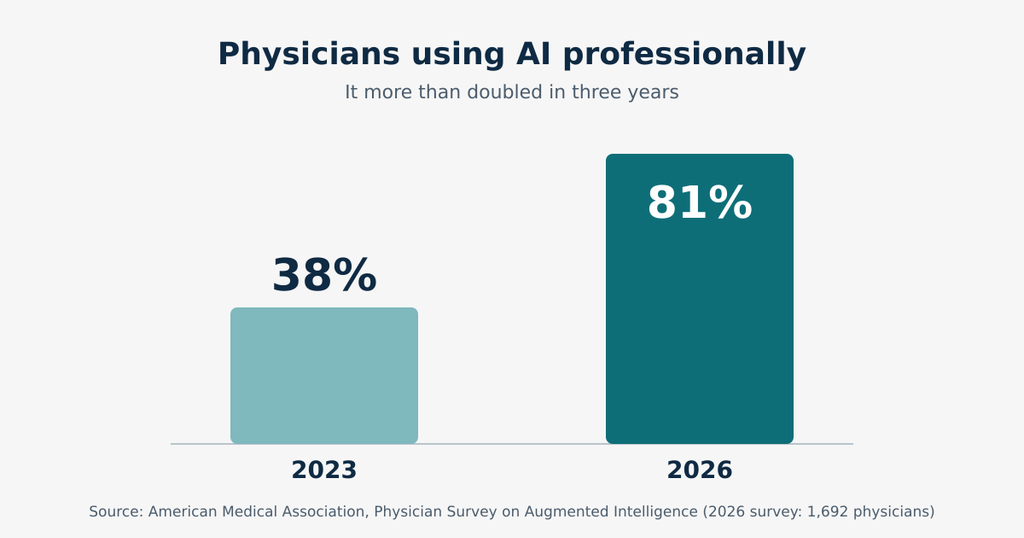
The American Medical Association’s 2026 Physician Survey on Augmented Intelligence found that 81% of physicians now use AI professionally, up from 38% when the AMA first asked in 2023.
The survey, which polled 1,692 physicians between January and February 2026, also found that the average number of AI use cases per physician climbed from 1.1 to 2.3.
What are doctors using it for?
Mostly the unglamorous stuff (contrary to popular belief)
According to the same survey, 39% use AI to summarize medical research and standards of care, and 30% use it to help create discharge instructions, care plans, or progress notes.
That tells you something important: right now, AI in healthcare is winning most in paperwork and information overload, not in replacing clinical judgment.
If you’ve ever spent your evening finishing notes you couldn’t get to during the day, you can see why that’s where the interest is.
The upside: where AI actually helps
Less time on documentation
Documentation is the thing nobody went into care work to do.
AI scribes (also called ambient AI documentation) are one of the most studied examples.
A multi-site study published in JAMA in 2026, led by researchers at Mass General Brigham and UCSF, tracked AI scribe use across five U.S. hospitals for more than two years.
The results were positive but modest: clinicians saved about 16 minutes of documentation time and 13 minutes of EHR time per day, roughly 10% and 3% reductions.
Not a revolution, but not nothing either.
The researchers also found that clinicians who used the tools for more than half of their visits saw bigger gains.
Possible relief from burnout
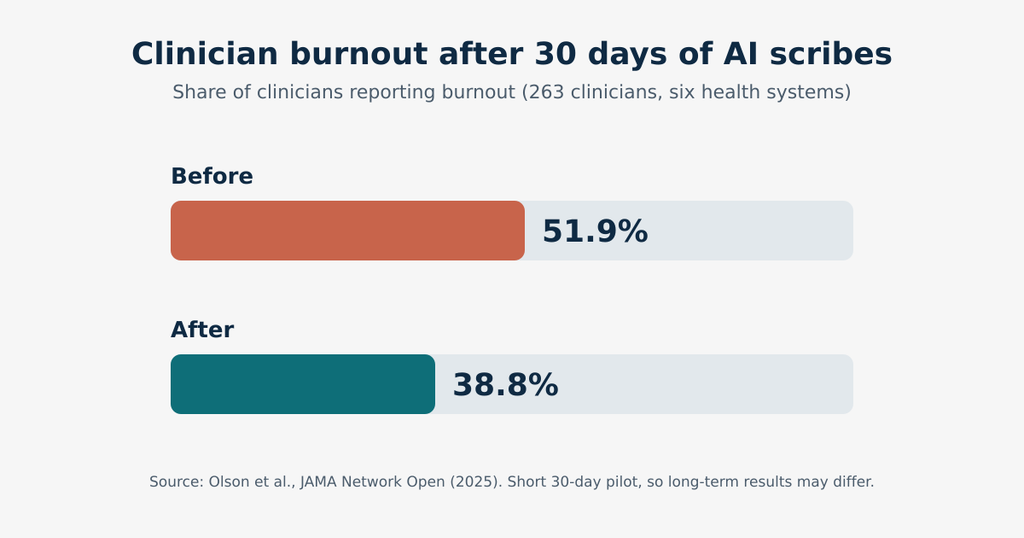
A Yale-led study in JAMA Network Open followed 263 clinicians across six health systems for 30 days of AI scribe use. Burnout dropped from 51.9% to 38.8%, and participants reported less after-hours documentation and more attention for patients.
Here’s the nuance, though.
The Mass General Brigham researchers noted that the modest time savings alone probably don’t explain the burnout improvements, so we don’t fully know why these tools help people feel better.
It could be due to the reduced mental load. Or it could be because it’s simply feeling less chained to a keyboard. More research is coming.
Better focus on people
This is the big one for anyone in care management or advocacy.
Every minute not spent retyping or reformatting is a minute you can spend on the person in front of you.
When software handles the repetitive stuff well, the human parts of the job get more room.
The catch: where AI can go sideways
We’d be doing you a disservice if we only told you the happy parts. Even the people who like these tools have concerns.
Accuracy and “hallucinations.” Generative AI can produce text that sounds confident and is simply wrong.
In one small Danish pilot of an ambient scribe, frequent errors, missing information, and hallucinations limited clinicians’ trust and kept them from saving time. It was a tiny study (two clinicians), so don’t over-read it, but it illustrates the point: AI drafts need human review. Always.
Privacy. In the AMA survey, about 40% of physicians said they’re equally excited and concerned about AI, and patient privacy and the integrity of the patient-physician relationship topped their list of worries. Another 86% said data privacy is important to broader adoption, and 88% said the same about robust safety validation.
Skill loss. The AMA survey also found that 88% of doctors had at least some concern about AI-related skill loss. It’s a fair question for any profession: if the tool writes the first draft every time, what happens to our own muscles?
Unclear accountability. Physicians ranked clear liability frameworks as the top regulatory action needed to build trust in AI, and 85% want to be consulted or directly involved in decisions about adopting it. When something goes wrong, who’s responsible: the user, the vendor, or the organization that bought the tool? That question still doesn’t have a tidy answer in many settings.
HIPAA and AI: the part you can’t skip
If your work touches protected health information (PHI), HIPAA doesn’t take a day off just because a tool is “smart.”
Here are the basics worth knowing:
- HIPAA applies to the data, not the buzzwords. An AI system that handles PHI is subject to the same privacy and security expectations as any other system that touches that information. Public tools are not exempt. Even a simple scenario like a clinician pasting notes into a consumer chatbot raises HIPAA questions.
- Vendors need a Business Associate Agreement (BAA). An AI vendor that accesses PHI on behalf of a covered entity is generally a business associate and should sign a BAA before touching patient data. A good BAA addresses how the AI interacts with PHI, what happens to data after processing, and whether your data gets used to train or improve the vendor’s models.
- “Minimum necessary” still matters. Systems should only access the specific information they need for the task. If a scheduling assistant is pulling a full chart into its working memory, that’s a red flag.
- Know where your data goes. If a vendor sends your data to a third-party AI provider behind the scenes, that provider may also be a subcontractor under the BAA. Ask about it.
- Keep an inventory. Legal commentators note that practices are increasingly expected to keep a comprehensive asset inventory of every technology tool in use, including AI agents and “shadow IT”. Translation: if someone on your team quietly started using an AI app, you want to know about it.
Regulators are still catching up, too.
A federal advisory committee (NCVHS) recommended in an April 2026 letter to HHS that the department gather more information on how AI affects patient privacy and data.
Rules are evolving, so what’s acceptable today may be tightened tomorrow.
Quick disclaimer: this post is general information, not legal advice. If you have a specific compliance question, your attorney or compliance officer is the right person to ask.
What does the FDA have to do with it?
Not every healthcare software tool is a medical device, but some are, and the FDA keeps a public list of AI-enabled devices it has authorized.
As of September 2026, that list has passed the 1,600-device mark. A few things to know about it:
- It’s overwhelmingly radiology. Roughly 76% of the authorized AI devices are in radiology, according to analyses of the FDA list. Think imaging triage and image analysis.
- It’s not a census. The FDA itself says its list isn’t a comprehensive inventory of every device that uses AI.
- “Authorized” isn’t the same as “approved.” Most of these devices went through the 510(k) clearance pathway rather than full premarket approval, so “FDA-authorized” is the more accurate phrase.
- Generative AI is the new frontier. On August 18, 2026, the FDA published a discussion paper called Considerations for the Regulation of Generative AI-Enabled Medical Devices, which looks at questions like how to assess risk for these newer tools.
- Decision-support software gets sorted. The FDA’s January 2026 guidance on clinical decision support software helps determine whether a tool counts as an unregulated administrative aid or a regulated medical device.
For most care management teams, the practical takeaway is simple: if a vendor claims their AI does something clinical (diagnoses, recommends treatment), ask whether it’s FDA-cleared or why it isn’t considered a device.
If the tool is administrative (organizing, summarizing, tracking), the FDA question is usually less central, but the privacy questions get bigger.
Questions to ask before you buy or adopt any AI-powered tool
Whether you’re evaluating a new platform or a new feature in software you already use, here’s a handy checklist:
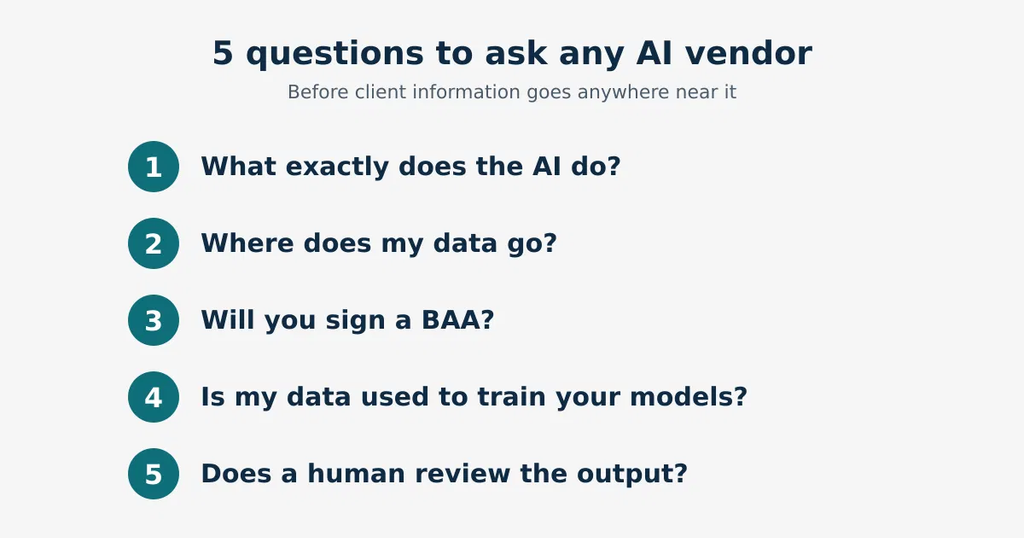
- What exactly does the AI do? Get specifics. “Smart insights” isn’t an answer.
- Where does my data go? Which servers, which subcontractors, which countries?
- Will you sign a BAA? If the answer is anything other than a confident yes, that’s your answer.
- Is my data used to train your models? If so, can I opt out, and is that in writing?
- How are errors handled? Does a human review outputs before they’re final? Can I see what the AI changed or generated?
- What security controls are in place? Look for encryption, role-based access, and audit logs showing who accessed what.
- Can I turn it off? Good software lets you choose which AI features you use.
- What’s the track record? Ask for references or published evidence, not just a demo.
- Who’s accountable if something goes wrong? Check the contract language, not just the sales pitch.
Building a simple AI policy for your team
You don’t need a 40-page manual.
But you do need something, because people will use AI tools whether or not you’ve told them it’s okay.
A basic policy might cover:
- Approved tools only. List the tools staff can use with client information, and make clear that unapproved apps are off-limits for PHI.
- No PHI in public tools. Consumer chatbots and free apps generally don’t come with BAAs.
- Human review is mandatory. Anything AI-generated gets checked by a person before it goes into a record, a report, or a court filing.
- Train and revisit. A one-hour session on what AI can and can’t do prevents a lot of headaches, and this space changes fast, so review the policy every few months.
The AMA offers resources on establishing an AI governance framework and reducing documentation burden with AI for physician practices, and the same principles scale down to smaller care teams.
So, is AI good or bad for healthcare software?
Neither, really. It’s a tool, and tools are only as good as the thinking behind them.
The honest summary looks like this:
- The adoption is real. Four in five physicians are already using AI in some form.
- The benefits are real but modest. Documentation time falls a bit, burnout may improve, and the biggest wins go to people who use the tools consistently.
- The risks are real, too. Accuracy, privacy, and accountability all deserve attention.
- The rules are still taking shape. HIPAA applies today; FDA and federal guidance keep evolving.
If there’s one idea to take with you, it’s this: good AI supports your judgment; it doesn’t replace it.
The most useful software in this field respects the fact that accuracy, continuity, and trust matter at least as much as speed, especially when you’re coordinating care for vulnerable people or accounting to families, agencies, and courts.
Where does that leave you?
Start small and stay curious.
Pick one pain point, like documentation, report prep, or tracking follow-ups.
Look for tools built for your actual workflow(like My Junna), ask the hard questions on the checklist above, and insist on privacy protections you can verify.
And keep a human in the loop every time.
At My Junna, we build client management software for care managers, patient advocates, social service professionals, and guardians, with HIPAA compliance, a signed Business Associate Agreement, and a public Trust Center because we know that trust isn’t a nice-to-have in this line of work.
Curious how it could fit your team’s day? Book a demo and ask us anything, including the tough questions.


